For customers · 3 min read
Signing up as a customer
Create a customer account in about a minute and land in your Customer Portal.
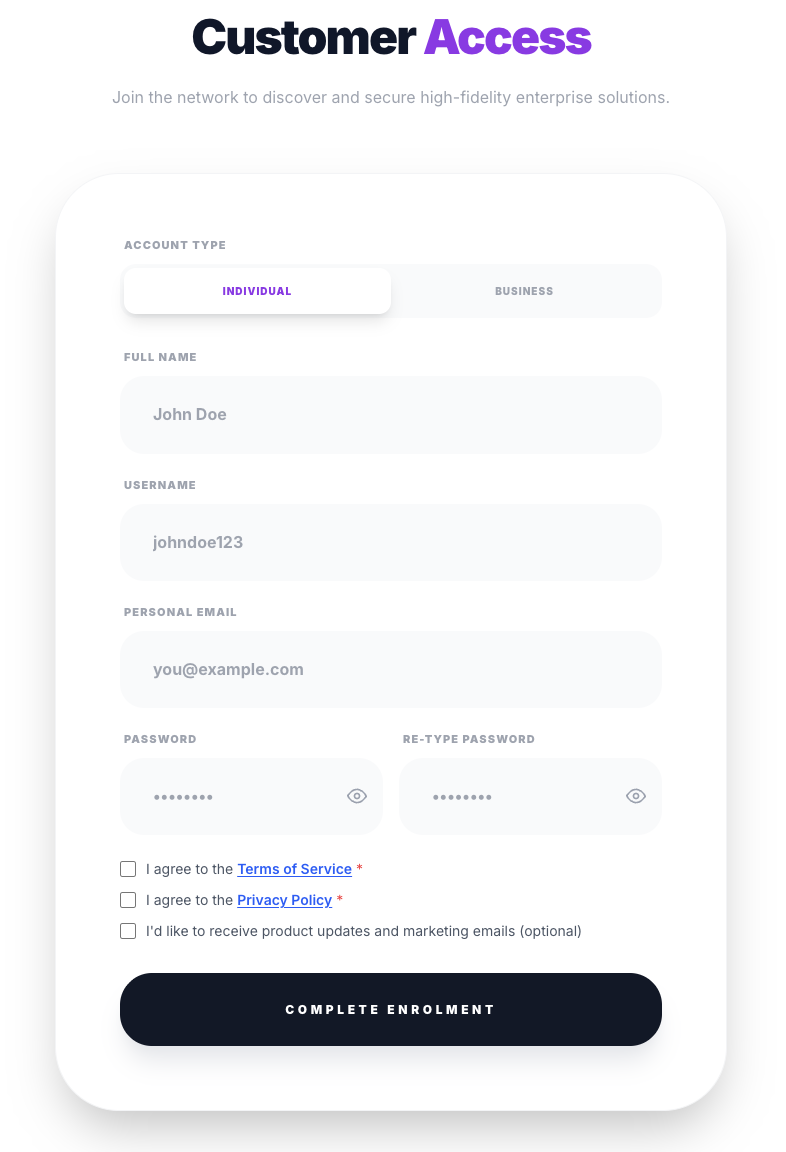
Customer sign-up is self-serve and takes about a minute. It is a single form — no documents or approval step.
Before you start
- Have a valid email address you can check for a verification link.
- Decide whether you are signing up as an Individual or a Business — a Business account adds a company name.
Step by step
- 1From the top navigation choose “Join” (this opens the customer sign-up at /register).
- 2Pick your account type — Individual or Business. Choosing Business reveals a Company name field.
- 3Enter your full name, a username (at least 3 characters), and your email.
- 4Set a password (at least 8 characters) and confirm it.
- 5Accept the Terms of Service and Privacy Policy. Marketing emails are optional.
- 6Submit the form, then verify your email from the link we send you.
What happens next
Once you are in, you land straight in your Customer Portal, ready to browse the Directory and start ordering. See “Your customer portal & order tracking”.
Complete your details in Settings
Before your first order, open Settings in the Customer Portal to fill in your profile. What is required depends on your account type.
- Business accounts must complete a few required fields before saving: business name, work phone, operating country, business address, and license number. The TRN / VAT number is optional.
- Individual accounts only need a name; a phone number is optional.
Shipping address (saved as a template)
Both account types can save a default shipping address — address lines, city, region, postal code, country, and delivery notes. It works like a template: it pre-fills the checkout so you do not retype it each time, and you can still change it during any individual checkout without altering the saved default.